What Eddy Bridge does on your home network
Eddy Bridge is the software inside your home that can reach your entertainment devices. It receives an Eddy request, sends the configured local command and returns a result. Keeping that local connection inside the home avoids opening an inbound router port directly to each controller.
The original Bridge ran as a Raspberry Pi image. Eddy Bridge V2 is a new agent project targeting Windows, macOS, Linux and Raspberry Pi. V2 remains a development preview; implementation and installer work do not establish a public release or compatibility with every device.
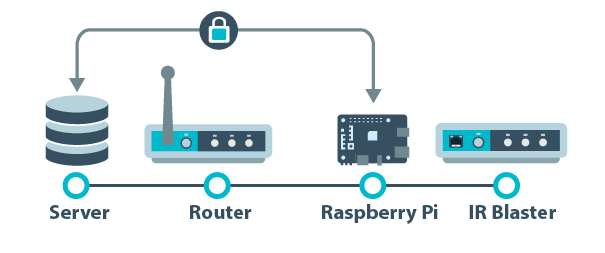
How the connection works
In the V2 cloud design, the agent initiates a secure outbound connection to Eddy’s relay. Eddy sends requests and receives results over that established link. The agent then talks to the selected controller on your local network.
The machine running the agent must stay awake and connected. A laptop that sleeps will interrupt this route. Desktop startup also depends on the configured user sign-in behavior, while a service-based Pi or Linux installation can be arranged to start at boot.
What the secure connection covers
The V2 cloud link uses verified TLS encryption and per-agent authentication. That protects this connection; it does not mean every local device protocol is encrypted. Some entertainment equipment accepts plain local HTTP or TCP commands.
Protect your Eddy account, keep the agent host maintained and restrict local network access appropriately. Optional local setup and Matter services have their own access requirements. Avoid forwarding those local ports through the router just to make discovery work.
Which controls are possible
Useful control methods include supported HTTP or TCP commands, network IR controllers, Wake on LAN and HDMI-CEC with compatible hardware. The current V2 source also includes several device adapters. A listed adapter is a reason to test your model, rather than a guarantee that all its buttons or power states work.
CEC requires supported onboard hardware or a suitable USB-CEC adapter. An HDMI connector alone does not prove CEC capability. Android control requires an appropriate authorized ADB connection, not just an Android device on the network.
Discovery can help find supported local services. It is not an inventory of every controllable device, and a discovered result does not confirm every command. Test one observable action before building a complete activity.
Cloud and local control
The optional V2 Matter companion maps configured on and off actions into a local Matter outlet. It does not expose a full TV remote. The Homebridge work provides a separate local path with its own mapped controls and requirements. These development integrations need physical ecosystem and device validation.
A local control path can avoid Eddy’s cloud for its configured actions. Voice assistants, remote access and individual plugins can still have internet dependencies. Test the features you expect to use rather than assuming every part works during an outage.
Choose a practical host
A dedicated Pi can suit a setup that needs continuous availability. An existing Windows PC, Mac or Linux host may also be useful if it stays available and supports your device connection. Check the supported OS, architecture, helper hardware and release package before buying equipment.
Compare the complete cost, including a power supply, storage and any required CEC adapter, using current prices.
Start with one verified command
Choose the host, identify the controller’s supported protocol and test explicit on and off commands when available. Check what happens in the room. If a command times out, inspect the device before repeating a toggle or an entire activity.
The legacy installation guide covers the Raspberry Pi image. Confirm the appropriate V2 release instructions before using that newer agent. The controller and activity guide explains how commands fit into an Eddy setup.
Legacy Bridge overview video
This video illustrates the legacy generation. Its screens and installation details may differ from V2.