Port forwarding and Eddy Bridge compared
For a new Eddy installation, prefer the outbound agent route when the supported release for your equipment is available. The agent opens its connection to Eddy from inside the home. You do not need an inbound router rule that exposes the controller’s command port.
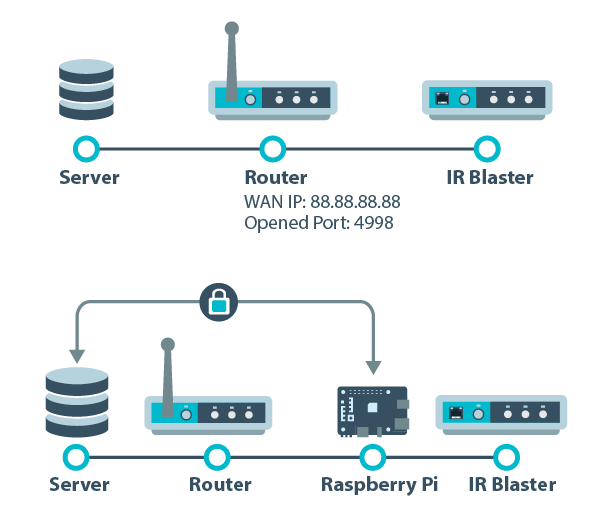
Generation note. The diagrams show the Raspberry Pi bridge used in 2018–2020 and its legacy installation. Eddy Bridge V2 broadens the software’s platform targets, but development source and a successful build do not establish a published installer or hardware compatibility.
What changes at the router
Port forwarding permits incoming traffic to reach a selected local service. A bridge or agent instead reaches Eddy through a connection it initiates. The difference is the incoming path you expose and maintain, not a universal claim that one piece of software is secure in every situation.
| Question | Port forwarding | Outbound agent route |
|---|---|---|
| Home router exception | An inbound mapping and matching firewall access are needed | No inbound home port forward is needed for the relay connection |
| Software in the home | The exposed service must remain available | The host and agent must remain awake and connected |
| Address maintenance | Destination and permitted incoming sources need maintenance | The agent maintains its outbound relay connection |
| Device capabilities | Depend on the exposed service | Depend on the configured adapter, helpers and hardware |
What a router filter does
Some current routers can allow a forward only from specified source IP addresses and restrict the destination service. The UniFi port forwarding documentation gives one concrete example. That narrows who can connect; it does not encrypt an unencrypted device protocol or add authentication to a controller that lacks it.
Source addresses must remain accurate. A changing mobile connection or a cloud service with several egress addresses can make a rule fail. Do not guess an Eddy source address or allow an entire cloud provider range. Use only an official Eddy source IP list if one is provided for your service; otherwise, do not create a rule from guessed addresses.
What the agent protects
The current agent design uses an encrypted, authenticated connection to the Eddy relay. Device commands then run through the configured local control method. A TV or network IR controller may still use an unencrypted LAN protocol, and someone on that LAN may be able to reach it directly.
Keep the host and router maintained, protect the Eddy account, and permit local device communication where it is needed. Removing an inbound forward reduces one exposure; it does not change the security features built into every controller.
Which capabilities should you check
The legacy bridge added useful local functions such as discovery, Wake on LAN and HDMI-CEC access. Current development code also contains several vendor adapters and optional Matter and Homebridge paths. Treat each as a control method to verify with your exact release and equipment. A discovered controller is not proof that every button or power command works.
CEC requires compatible hardware and a suitable helper. An HDMI connector alone does not establish support. A laptop host also needs to stay awake; closing its lid can interrupt control even while the router is working normally.
Keep migration small
- Identify the commands you use every day and keep a record of the working legacy configuration.
- Confirm the current agent’s release and platform requirements.
- Link one host, add one controller and test one observable command.
- Test explicit power on and standby separately, then check recovery after a host restart.
- Once the required controls work, remove obsolete router exceptions and verify the old public path is closed.
If you are maintaining the older Pi image, use the legacy bridge setup guide for that generation only. For personal remote administration, the UniFi remote access guide explains the separate VPN option. A personal VPN does not automatically carry Eddy cloud requests.