Update Firmware on the Legacy Eddy Bridge
This guide describes the browser-based firmware updater on the earlier Raspberry Pi Eddy Bridge. It is not the installation or update method for the V2 cross-platform agent. Identify the software generation and Raspberry Pi model before selecting an update package.
The links below are legacy model-specific packages, not V2 agent updates. Use a package only when its documentation identifies your exact model and version and provides the required integrity and recovery information. If that information is unavailable, do not upload an unverified file.
Prepare before updating
- Record the installed Eddy Bridge version and exact Raspberry Pi model.
- Keep a copy of the configuration using a method supported by that installed version.
- Confirm you have the correct update package for that model and a recovery method if the update fails.
- Choose a time when the equipment is not needed and keep the Pi on a stable power supply.
Historical package links
These links belong to the legacy Raspberry Pi image. Do not choose a package from its filename alone, and do not use these packages to update the V2 agent.
- Legacy Raspberry Pi 4 firmware page
- Legacy Raspberry Pi 3 firmware page
- Legacy Raspberry Pi Zero W firmware page
Use the legacy local updater
After compatibility and package verification, open the bridge’s local interface on your trusted home network. The earlier installation used http://eddy.local. If that name does not resolve, find the bridge’s actual local address in your router’s device list. A local-only hostname must be reached from the home network.
In the historical interface, open Advance → Firmware, choose the verified package and select Upload & Upgrade. The screenshot below shows that earlier updater.
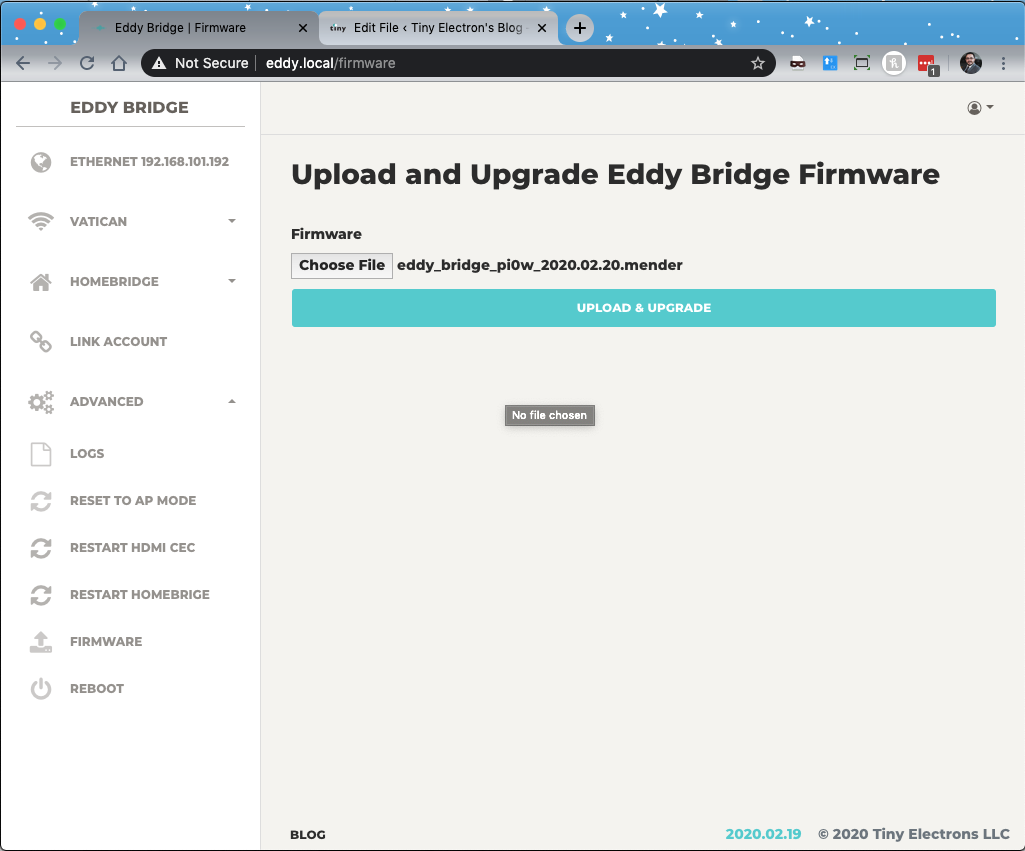
Historical firmware-upload screen for the earlier Raspberry Pi Eddy Bridge.
Confirm the update finished
Allow the update and any requested reboot to complete. Timing varies with the package and hardware. Avoid interrupting an active write, and follow the maintainer’s recovery instructions if the update reports an error or the bridge does not return.
When the bridge is available again, check its reported software version, controller connection and one known working button. Then test a short activity. Do not assume that the local page returning means every integration has passed.
For the legacy installation procedure, see Setting up Eddy Bridge. That article also describes the legacy generation and should not be used as evidence of current V2 release availability.