Understanding HDMI CEC frames and device addresses
HDMI-CEC lets compatible equipment exchange control messages over an HDMI connection. It can provide power, input and remote-control functions, but the available actions depend on the equipment, settings and control hardware. Start with the TV’s manual and test the command you actually need.
Legacy setup context. The Raspberry Pi diagrams and video show the earlier Eddy Bridge. V2 uses a different installation workflow, and CEC support depends on the release and connected hardware.
Check the physical control path
You need CEC enabled in the participating equipment and supported CEC hardware on the computer sending commands. A computer’s HDMI socket alone does not establish that it can send CEC. The libCEC project documents its supported platforms and hardware.
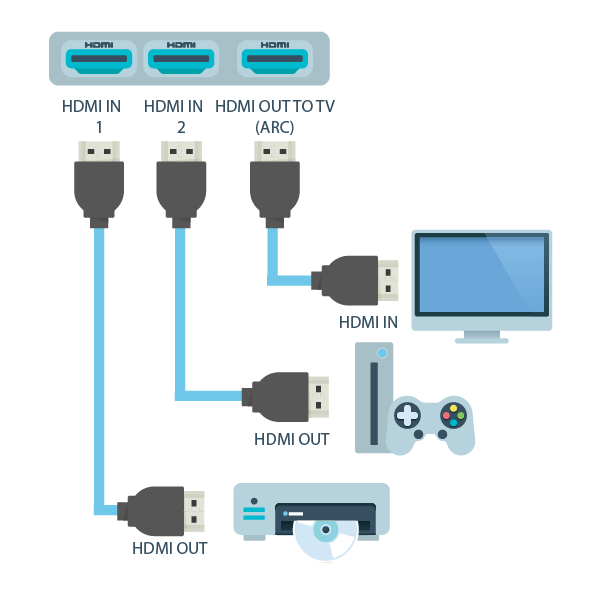
For compatible equipment, an action such as starting playback may also select the playback device as the active source. Test that behavior in your own HDMI chain rather than assuming every TV or soundbar implements it the same way.
Find the setting on the actual device
Manufacturers use names such as Anynet+, BRAVIA Sync, Simplink and VIERA Link for CEC-related settings. The precise label and default depend on the model and firmware. Check the manual for your TV, soundbar and playback device; a manufacture date alone is not a compatibility test.

Separate logical and physical addresses
A logical address identifies a CEC role. Examples include 0 for the TV, 4 for the first playback role and 5 for the audio-system role. The destination nibble F means broadcast. These values are different from physical addresses such as 1.0.0.0 or 2.1.0.0, which describe the HDMI connection topology. See the Linux CEC protocol documentation.
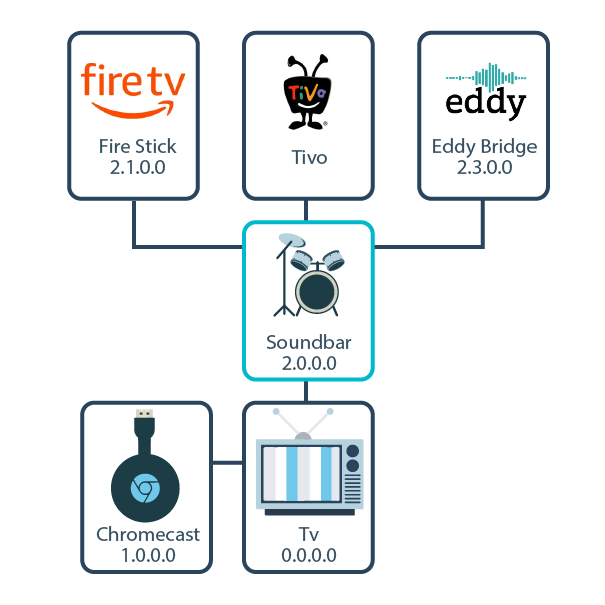
The physical addresses in this old diagram illustrate that particular connection layout. They are not addresses to copy to another room, and the logical address assigned to the sending adapter must be checked on the actual bus.
Read a frame without treating it as a recipe
Take 4F:82:10:00 as a decoding example only. Its header separates the source and destination; its opcode identifies the message; its remaining bytes carry that message’s parameters.
| Bytes | Meaning |
|---|---|
4F |
Logical source 4 and broadcast destination F |
82 |
Active Source |
10:00 |
Physical address 1.0.0.0 being announced |
0x82 is Active Source. Request Active Source is a different opcode, 0x85. The Linux CEC message definitions and libCEC message types define them separately. An Active Source announcement is not a general replacement for an explicit power-on request, and you should not announce another device’s physical address as your own.
Use supported commands before raw transmission
For an Eddy TV power mapping, validate the explicit ON and standby actions that the chosen control path supports. A tool’s high-level power command can involve protocol behavior beyond one raw frame. An Active Source announcement alone is not equivalent to that complete power-on operation.
Remote-key messages also need correct press and release behavior. Use the supported adapter or helper’s documented operation, and inspect the device after a timeout before retrying. A missing response does not prove that the first action had no effect.
Legacy CEC demonstration
The video shows the legacy setup. For frame meanings, use the definitions above: Active Source is 0x82 and Request Active Source is 0x85. Treat the video as a visual demonstration, not as a raw-frame command recipe; use the documented operation for your adapter and HDMI topology.
Test one result
- Enable CEC on the equipment that needs it.
- Confirm that the sending host detects a compatible CEC adapter.
- Test one explicit power command while watching the TV.
- Test standby separately and check recovery after a restart.
- Record the equipment and command result before expanding to input or audio control.
The legacy Eddy Bridge installation guide applies to the old Pi image. Confirm the current agent’s package and CEC requirements before using the V2 route.