How Eddy routes Alexa commands to your devices
Alexa and Eddy handle different parts of a voice command. Alexa interprets a supported request and sends it to the selected integration. Eddy maps that request to configured commands and reaches the equipment through the connection used by your installation.
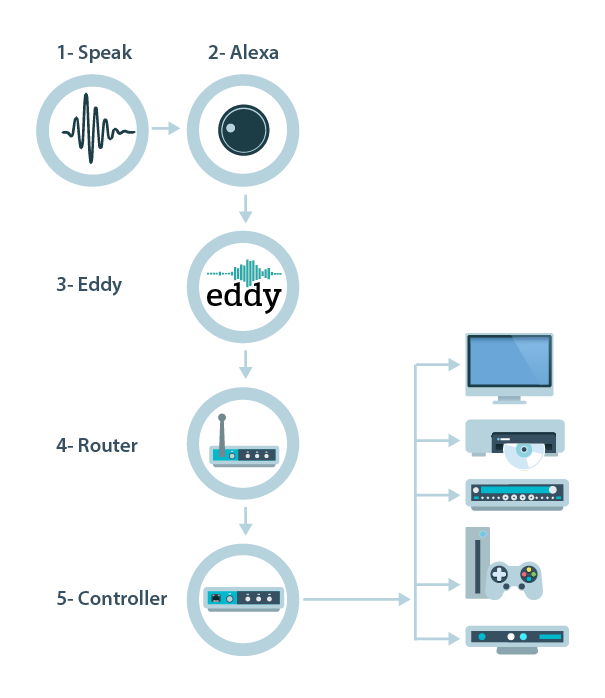
Legacy diagram note. The illustration below shows the original port-forwarding route. It explains that older setup. Avoid exposing a device-control port for a new installation. The outbound agent and local Matter paths described later use different connections.
Start with the right account and command
In a cloud skill setup, the Alexa account must be associated with the intended Eddy account where account linking is required. That connection identifies which service account should receive the request; it is separate from linking an Eddy agent to a bridge.
Amazon account linking documentation explains this identity relationship. A linked account alone does not establish that a particular button, activity or TV command has been configured correctly.
Use a phrase supported by the integration you actually enabled and a device name that is unambiguous in that account. A phrase such as turn on Living Room TV is an example of an intended action, not a promise that every skill or TV supports it.
Follow the legacy port forwarding path
- Alexa recognizes a supported request and passes it to the cloud integration.
- The Eddy configuration selects the device command or activity.
- The legacy service connects to the home’s configured public endpoint.
- The router maps that traffic to the selected controller on the LAN.
- The controller performs its configured action, such as transmitting an IR signal, and returns whatever result that protocol provides.
- The result travels back to the integration, which can report success or an error to Alexa.
The actual local action depends on the controller. Not every controller sends infrared. A network player or CEC control path performs a different operation.
Forwarding a port does not itself authenticate the caller or encrypt the device protocol. Source filters can narrow access on suitable routers, but they do not replace those service protections. For a new setup, prefer the outbound agent when the supported release is available. The UniFi remote access guide explains the separate roles of forwarding and encrypted remote access.
Follow the new outbound agent path
The agent design opens an encrypted, authenticated connection to the Eddy relay from inside the home. Eddy routes the request to the linked agent; the agent sends the configured local command and returns its result. The home router does not need an inbound forwarding exception for that relay connection.
The local command may still use an unencrypted device protocol. The host must remain awake, connected and able to reach the equipment. An online relay connection and successful physical control are different checks.
V2 remains a development preview. Its cloud route requires a matching website, relay and platform package, as well as support for your device. Keep that release scope separate from the older Pi image instructions.
Understand the separate Matter route
A compatible Matter accessory can use a local connection to a supported Alexa controller rather than the same cloud-skill request path. Amazon Matter documentation describes this local integration. The Eddy Matter development companion currently exposes configured on/off actions and still needs pairing and physical-device validation. It does not create a full TV remote or establish that voice processing and remote access work without internet.
Matter commissioning in the ecosystem app is separate from Eddy account pairing. During evaluation, use distinct accessory names so you can tell whether a command used the existing skill or the Matter route.
Check the result before repeating it
A success response means the integration completed its request according to the result it received. Some protocols acknowledge a send without observing the TV’s power or input. Check the actual device when that distinction matters.
If a command times out, look at the room before repeating a power toggle, volume change or activity. Earlier actions may already have happened. Start troubleshooting with one observable command, then check account linking, the bridge connection and the local device path in that order.
The legacy skill comparison explains the original two Eddy skill designs. Confirm present availability and supported phrases before choosing one for a new installation.